The Claude plugins that Anthropic provides may be astounding, but the real power comes from learning how to quickly and easily create your own custom Claude plugins - giving you not only the ability to greatly boost the ability for AI to automate the tedious parts of your particular job, but also a way to impose extra rigour and enforce standards (and potentially banish AI hallucination issues!)
In this post I’ll show you first how to use skills to teach things to Claude, demonstrate how you can then build powerful skills that leverage what you’ve taught it in order to quickly always give you pertinent answers back about your company, and finally I’ll show you how you can build a skill that can leverage external APIs…without even writing a line of code.
How to teach Claude
Custom skills for Claude’s chat interface are the most basic form of customised skills, but are still incredibly useful. They can be used to teach Claude about the way you work and the facts about your company, and are the first step in teaching Claude how to do the tedious parts of your job for you.
As a way of a very simple example, let’s see how we can get Claude to learn something that’s not known to the public. By default if I ask Claude “Where are my keys?” I get this bland generally unhelpful response:
That’s a question I unfortunately can’t help with! I don’t have any information about the location of your physical keys.
A few tips that might help though: try retracing your steps from when you last had them, check coat pockets, bags, and the usual spots like countertops, tables near the door, or between sofa cushions. They often turn up in the last place you set something down.
Hope you find them soon, Erena!
Maybe we could create a new skill to give Claude a way to know a little more useful info?
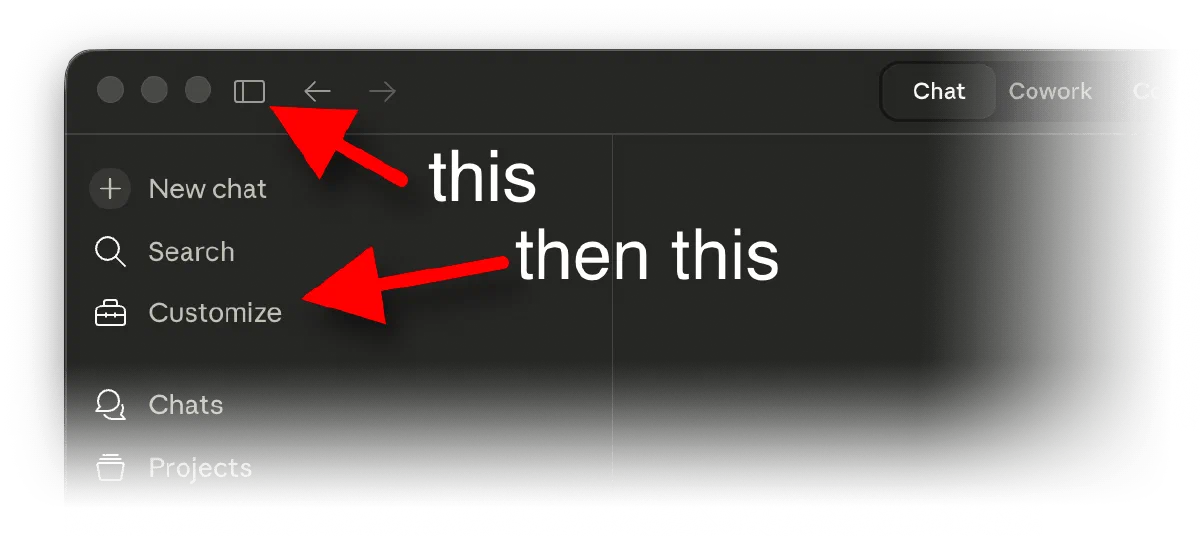
We can actually create chat skills like this in the desktop app fairly easily. From within the Chat tab we first pop open the sidebar by hitting the “Open Sidebar” button and then select “Customize”
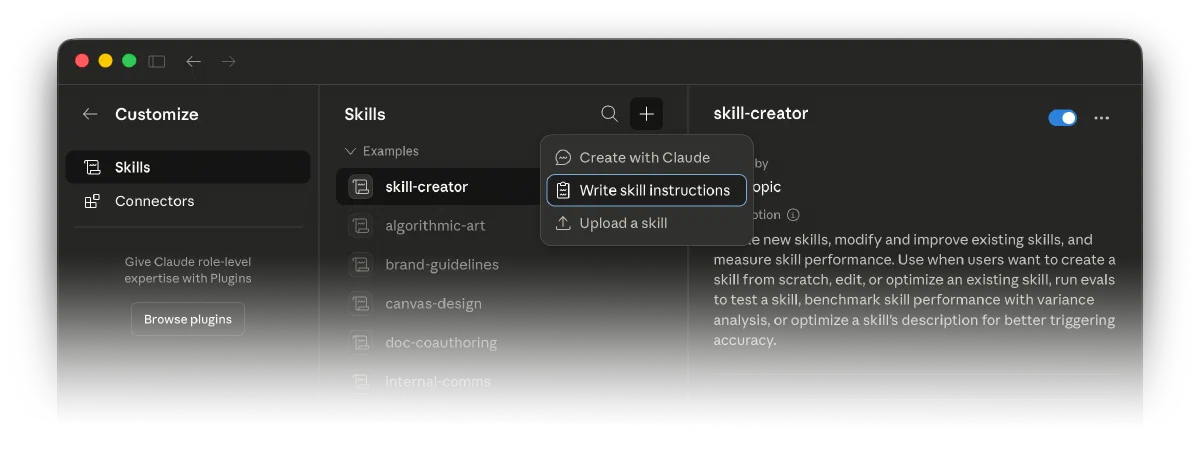
We then click “Skills”, tap the little plus icon, and select “Write skill instructions”
And finally we fill in the details of what we’re teaching Claude and tap “Create”
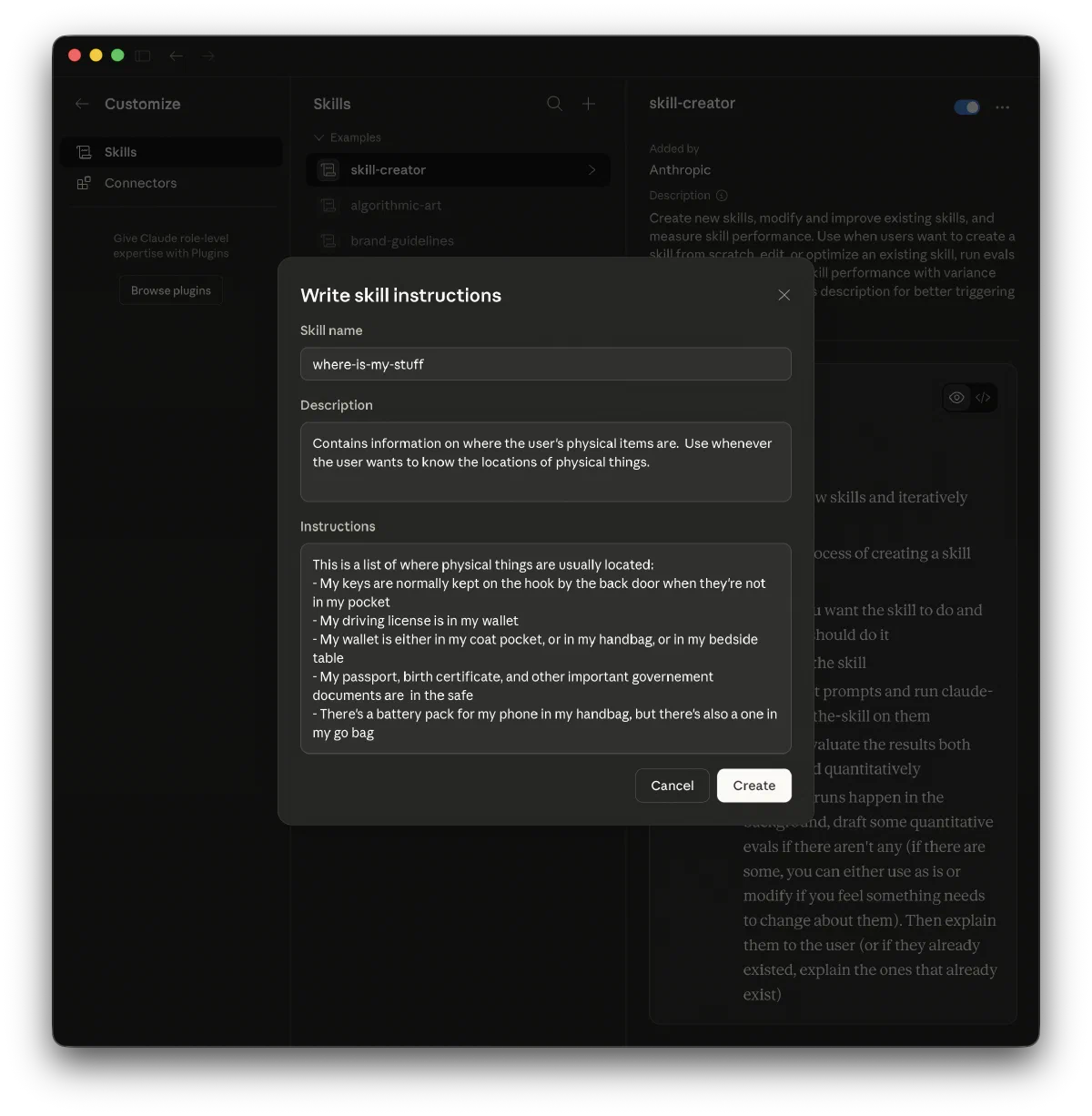
The three things we had to fill out were:
- Skill Name, the name of the skill (under 64 characters long).
- Description, short description of the skill for Claude to read so it can judge if this skill is appropriate for the question it’s currently processing or not.
- Instructions, a markdown document that describes what we want Claude to know whenever Claude decides it needs to use this skill.
Getting the description in these skills right is paramount. Unless Claude can figure out from the description that it needs to load the instructions into the context for this particular prompt it won’t have access to the info it needs when it needs it. It’s vital to understand that Claude doesn’t load all instructions for all skills always, as the instructions could be inappropriate and contradictory to the task at hand, and having too much stuff in the context can be “confusing” as it “dilutes” the importance of the actual prompt the user is using.
Anthropic’s “Complete Guide to Building Skills for Claude” documentation suggests the description should not only describe what the skill does but also have a “Use when…” type statement in it to help Claude make that decision intelligently.
Now we’ve got that skill enabled, let’s try asking Claude Chat “Where are my keys?” again
Let me check that for you.
Check the user’s skill for physical item locations
Your keys are normally kept on the hook by the back door — unless they’re in your pocket!
Success! We can see from Claude’s thinking that it decided to “Check the user’s skill for physical item locations” on the basis of the description, and then it was able to load the instructions into the “context” of the question and correctly answer the question.
Creating skills for the workplace
In the previous example we kept it simple - but there’s nothing stopping us doing something much more complicated related to our job. For example, for our next skill we could:
- Take the text of Anthropic’s compliance skill from their legal plugin
- Cut and paste it into the new skill dialog as a starting point to create a “new” custom skill (making sure to extract out the description after the colon in the “YAML” header at the start of the
.mdfile and copying everything below the second---into the “instructions” field) - Then add extra information about our company in the body of the text
- What’s the name of our company (we’ll use Jessops again in this example)
- Where our privacy policy is
- Who our current data protection officer is (P. Sherman, 42 Wallaby Way, London, UK)
- That we currently operate in the UK, and all the data is held in the UK. We do not have any employees in any other country.
- The fact that we’re compliant with the GDPR.
Now we have a custom skill that not only knows about how to do compliance, but knows about our firm! This means we can easily ask much more complicated questions like this:
We’re thinking of expanding our company to operate in Malaysia. I understand that the privacy legislation there is different - perform a gap analysis to determine what we’d need to do to operate legally.
I did similar analysis for a real firm within the last twelve months, and I was curious to see if Claude would pick up on the same issues.
Given the prompt, Claude thought for a while, saying things like “I’ll start by reading the compliance skill to understand the best approach…” After a minute or two it finally created a full eight-page Word document containing ranked problems.
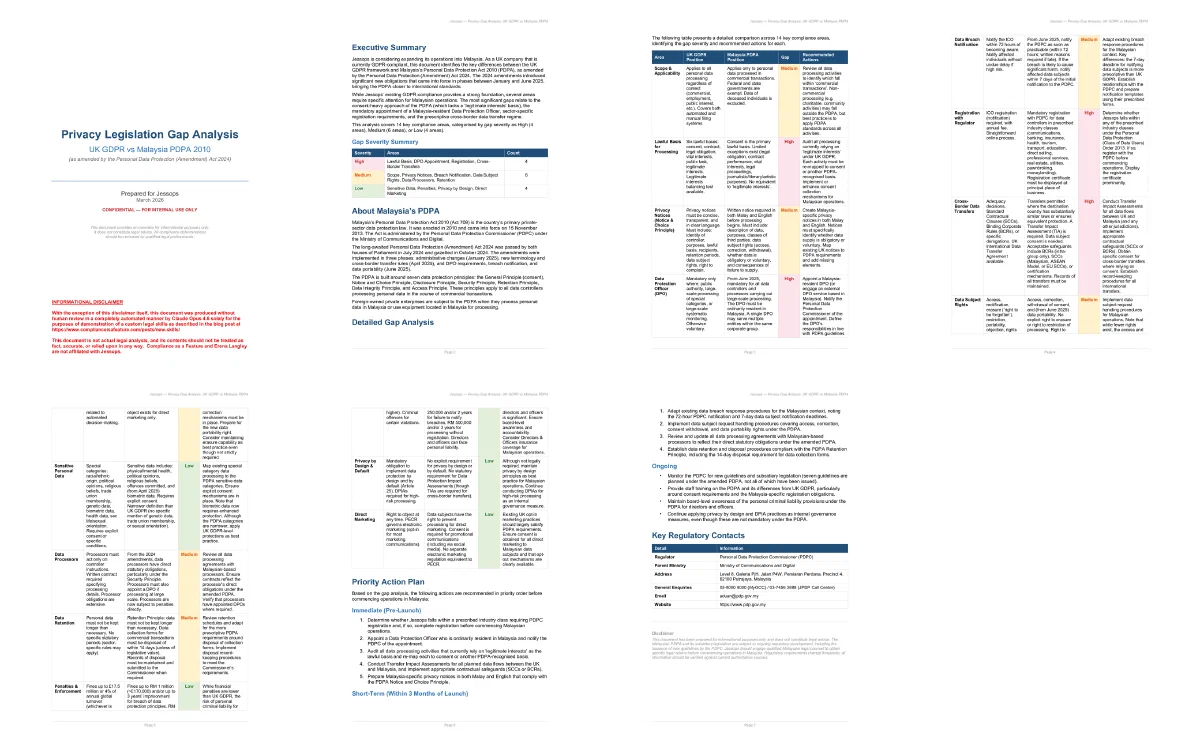
Not only did the document produced know the name of the company, but it was able to flag what I’d consider the most pressing issues based on facts that it could only deduce from what we taught it in the skill! For example the fact that all the data was processed in the UK (meaning in order to operate consent must be obtained from the data subject when the data is collected for the data to be exported to the UK) and that the firm only had UK employees (meaning that no-one currently employed was suitable to be a DPO, as the DPO must be based in Malaysia).
No-one is pretending that document is sufficient legal analysis. When I did the same exercise I read the entire English translations of all the laws and amendments, followed up with various departments to establish the exact exposure, and produced a report that referenced the exact clauses of the law in question so we could later judge if the changes we were proposing implementing would meet the exact definition of the law or not.
But what this document is is arguably exactly what was asked for - a quick “gut check” about the scope of the problem, and something that we were able to put together in minutes with no more effort than typing two sentences. Having the ability to quickly create this kind of top-level “inaccurate” document at near zero cost is really useful, as it facilitates strategic brainstorming unshackled from the demands of a compliance team’s backlog.
A More Complicated Skill
We’ve seen the power we can get by using a simple skill that just contains instructions to the AI, but what can we achieve if we actually create a plugin that’s able to go out and access relevant external resources on the Internet and feed them back into our AI as it needs them?
One of the most common problems with people using AI is forgetting that an AI is fallible, will happily hallucinate facts if it feels it should, and it’s essential to check any output it produces. In the legal sphere the most embarrassingly common form of this is when you’re processing a document with AI and miss that it just got the name of a case or law wrong, or worse, made it up entirely.
The answer is, of course, to go through any document that the AI produces, work out what cases or laws are mentioned, and then painstakingly look up each of the laws and cases in question and check them.
What if we created a skill that had the AI do all of that for us?
What we’re going to do is create a skill that solves a simple subset of the problem. Identify laws (not cases yet!) and check them against https://www.legislation.gov.uk/ to determine that they’re real and have the correct name.
So, the first step - before we actually create anything - is to go into the settings for the Claude desktop app and in the “Capabilities” section to allow access to legislation.gov.uk:
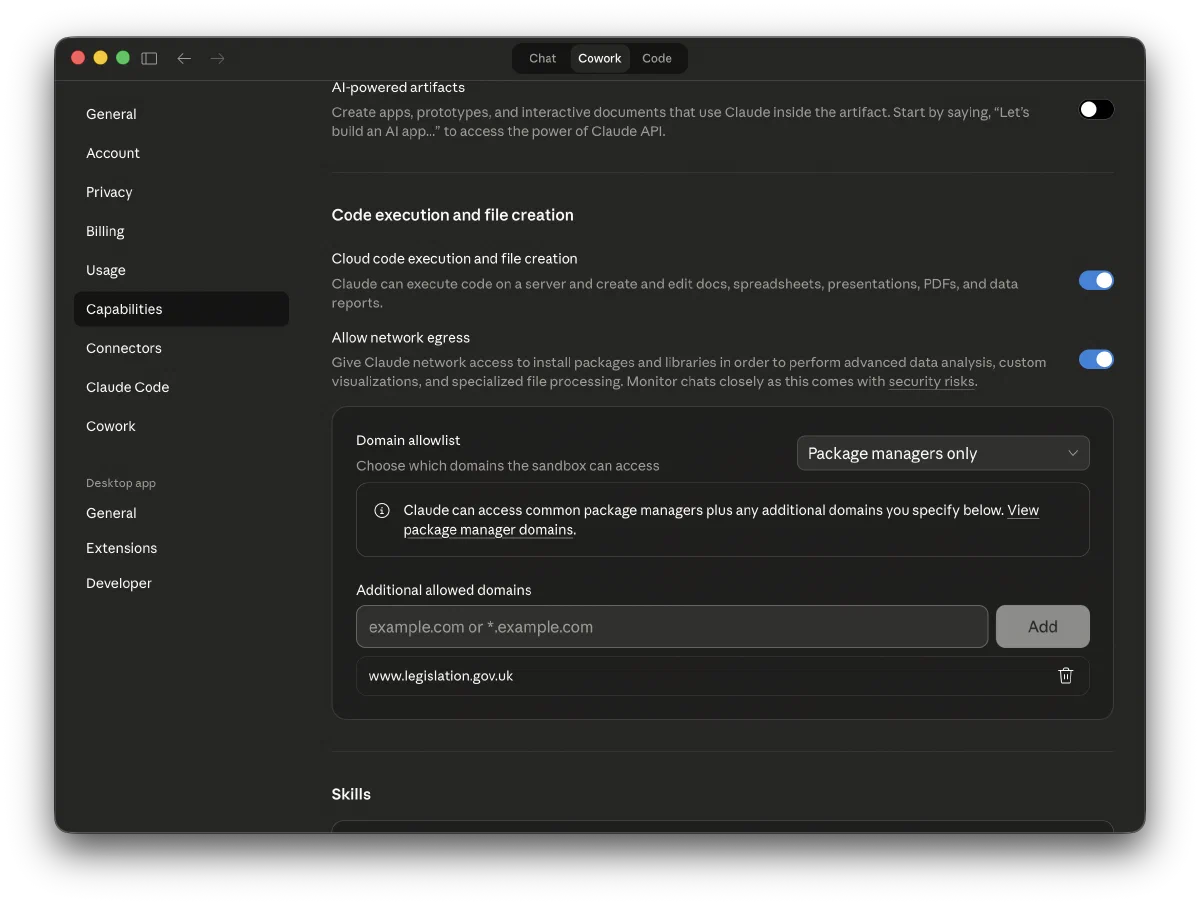 Then we need to create a new plugin that’s able to make HTTP calls to the API.
This is more complicated than creating a single page of instructions. At this point in the tutorial I could explain the file hierarchy in a plugin, the format of the documents, the programming languages and environment available to our plugin, and how tests can be written to verify that the plugin is behaving as it should. All of that I would explain if we were going to actually write the plugin ourselves - but this is the future, and in the future we don’t do that: We ask the AI to write the code for us.
In fact, Claude even has a skill for this - a skill for creating new skills - which we can trigger literally by asking Claude Cowork to “Create me a new skill”
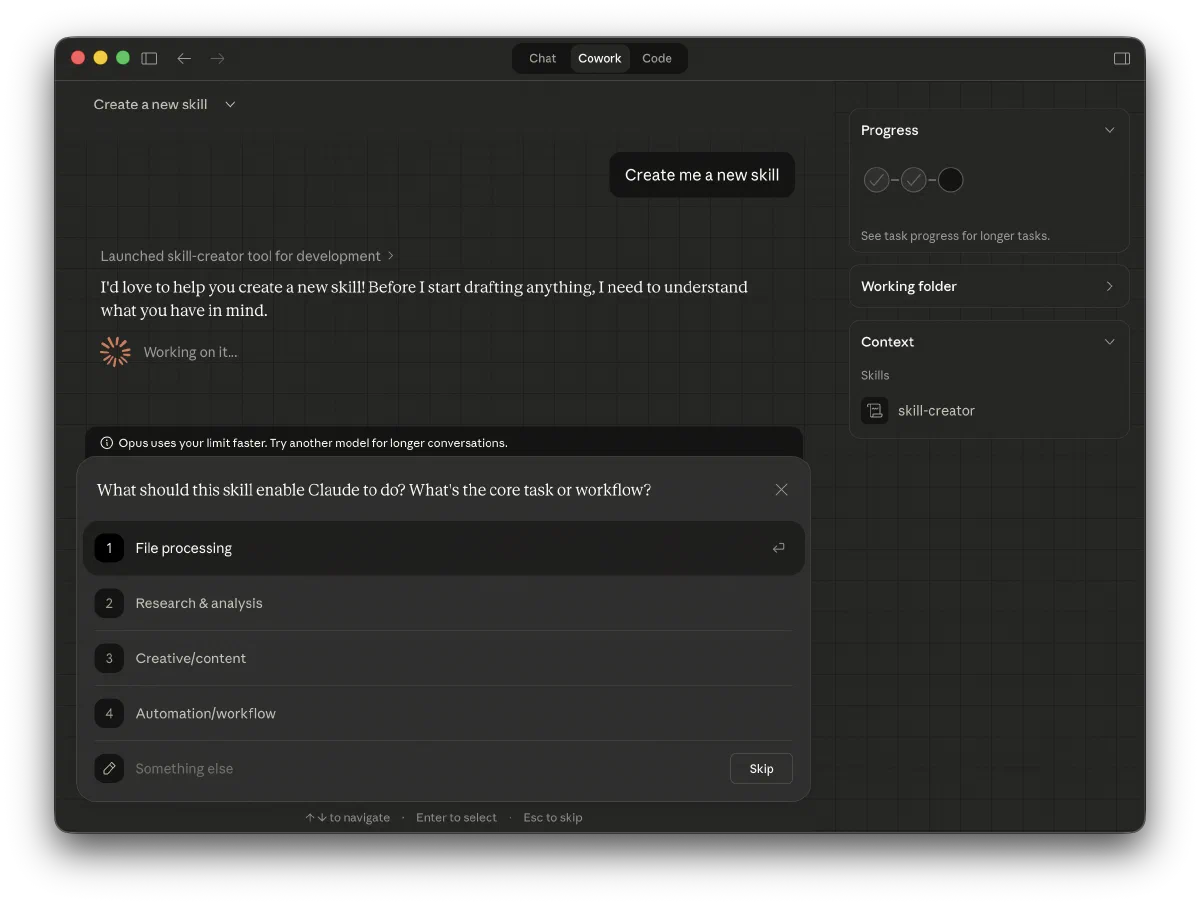 This kicks off a bunch of interactive questions that Claude will ask us step by step.
After it’s got enough info together Claude writes the code for us…we never have to open an editor.

(this took quite a while to run, and even - as you can see - exhausted my per-5 hour token limit for my $20 a month plan, forcing me to wait before continuing)
The output of the skill can be seen here, in this screenshot of a Word document Claude produced where it has annotated in comments all the wrong law names it’s detected (this example actually comes from the test suite Claude wrote for itself!).
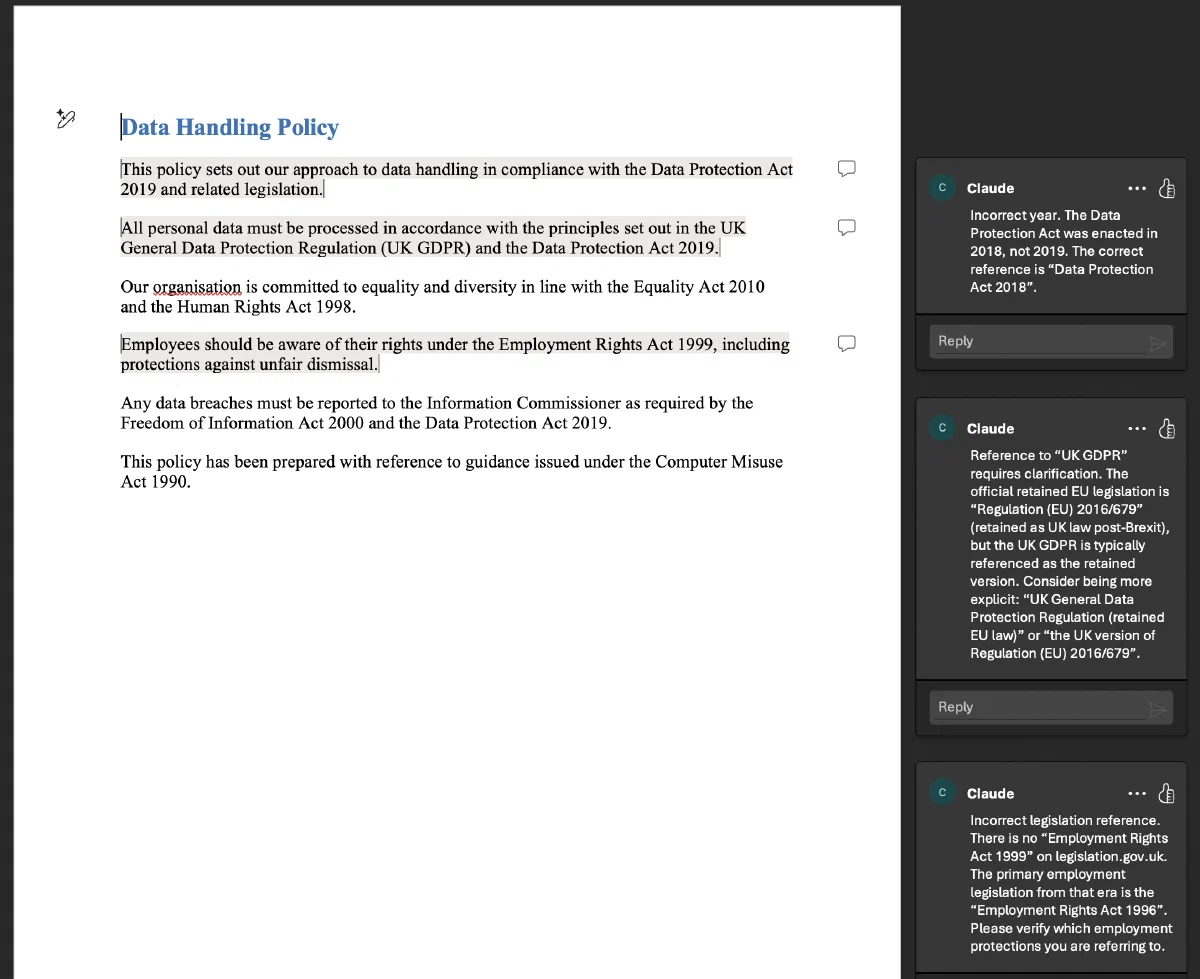
I’m quite impressed that I was able to put such a complicated tool together without having to even so much as look at a line of code.
Conclusion
By teaching Claude through skills about your role, by having Claude build powerful skills that replicate what you do manually, Claude can move beyond the “overpowered search engine” and “word processor interface” role that it’s often denigrated to.
While current AI isn’t flawless, we can see that with a little imagination we can produce skills that enable it to become a genuinuely useful assistant. It now allows us, with very little effort, to create the personal automation workflows that would have been prohibitively expensive and time consuming to make with traditional software development.