What exactly is the Claude Legal Plugin? Whenever the launch of a new technology in your field causes the London Stock Exchange group to drop 13% in value, it’s probably worth trying to fully understand that technology properly.
While journalists and pundits have written many articles (or, I guess in this day, had AI write them many articles) based on talk on the potential of this technology I’ve seen comparatively little first hand accounts of using the plugin itself. To get a good understanding of what the technology can actually offer us today, I’d like to take you through a demonstration of what it actually outputs when given a practical task, and I’d like to show you the step-by-step instructions on how you can get the plugin setup for yourself so you can perform your own evaluation by trying your own workflows.
What is a Claude Skill, and What is the Legal Plugin?
Most people who have a surface level experience with using Claude have only ever used it in the basic free model accessed through the web interface. By limiting themselves to this way of working they’re missing out on the much more powerful models that Anthropic only offers to paid customers, and may not even realise what a dramatic improvement these newer cutting edge models provide.
Even more importantly, they’re missing out on Claude’s “Skills” plugin system.
Claude Skills are available to users of Claude Code and Claude Cowork - two complementary ways of using Claude designed to run on your computer opposed to running in a web browser. The former, Claude Code, is as the name suggests a way of using Claude to primarily write code. The latter, Claude Cowork, however is a feature of the Claude Desktop app positioned as a more general purpose tool designed for manipulating more “office” like files on your computer, running programs on your behalf, and generally automating your work for you.
Skills are bundles of markdown prompts that explain to Claude how to do new things or behave in a certain way. Some of these skills contain bundled programs that the skill explains how to use, such as the in-built Claude Cowork skill that teaches Claude to use a bundled program to manipulate Word documents. Other skills are just pure markdown prompts that teach Claude workflows or how to adopt “personas” for particular tasks.
Skills are enabled whenever you invoke them in Claude by using a “slash command” at the start of the prompt. For example the Legal plugin contains a “compliance” skill that makes Claude adopt the persona of a compliance specialist whenever you start the prompt with /compliance. This skill is nothing more than a file of very readable text which gives Claude a quick tutorial on the top level ideas of privacy law and compliance standards whenever the skill is used.
A key understanding here is that the best people to understand and create these types of plugins are not developers - they’re the lawyers, the compliance specialists, the domain experts in the area that the plugin is operating in. So you should absolutely feel free to dig into the source of the plugin to understand what’s going on (and, as I’ll explain in a later post, modify the skill or create a new one of your own).
What kind of output can you actually expect from Anthropic’s Legal plugin?
Let’s jump right in by asking Claude Cowork to perform a typical tedious compliance task - reviewing the privacy policy for a website. I’m going arbitrary choose Jessops, the website of a mid-sized high street retail firm in the UK.
To do this we type the following prompt to Claude Cowork using the /compliance slash command to trigger the aforementioned compliance skill:
/compliance Please review the privacy policy for jessops located at https://www.jessops.com/c/help/privacypolicy and tell me if there’s anything that needs to be changed
When I’ve selected the Claude Opus 4.6 model (i.e. Anthropic’s latest and greatest model), Claude Cowork responds to my prompt with the following output:
I’ve reviewed the Jessops privacy policy in full. There are several issues ranging from serious legal compliance problems to minor editorial oversights. Here’s what I found:
Critical issues that need immediate attention:
EU-US Privacy Shield is invalid. The “Where is my data stored?” section still references the EU-US Privacy Shield as a safeguard for transfers to US-based organisations. The Privacy Shield was struck down by the CJEU in the Schrems II decision back in July 2020. This should be replaced with a reference to the EU-US Data Privacy Framework (adopted 2023) or the UK Extension to the Data Privacy Framework, along with Standard Contractual Clauses and UK International Data Transfer Agreements as appropriate.
Internal draft note accidentally published. Under the “To make our site and Apps better” section, there’s a sentence that reads: “If we use Mixpanel’s cookies rather than their server-side functionality, we also need to add a line in to the cookies section of the policy (naming the cookie with a sentence on what it does).” This is clearly an internal editorial note that was never meant to be public. It should be removed immediately and the underlying question it raises (whether Mixpanel cookies are in use) should be resolved.
Cookie consent model is non-compliant. The policy states “by continuing to browse the site, you are agreeing to our use of cookies.” Under UK GDPR and the Privacy and Electronic Communications Regulations (PECR), implied consent through continued browsing is not valid for non-essential cookies. The ICO requires active, affirmative consent — typically through a cookie banner with granular accept/reject options.
Other issues worth addressing:
The legal basis for phone/chat enquiries is stated as consent, but this is arguably the wrong basis. If a customer calls with a question about a potential purchase or order, legitimate interest or pre-contractual steps would be more appropriate. Relying on consent here means the customer could withdraw it mid-conversation, which creates practical problems.
The policy has no “last updated” date, which is considered best practice and is something the ICO looks for. There’s no way for users to know how current the policy is.
The “Do Not Track” browser feature is referenced as a way to opt out of personalisation, but DNT has been widely deprecated — most major browsers have removed or are removing support for it. This guidance is effectively meaningless now.
The ICO jurisdiction description is slightly off. The “Right to complain” section describes the ICO as the supervisory authority for “England and Wales,” but the ICO actually covers the entire United Kingdom (England, Wales, Scotland, and Northern Ireland).
There are no references to UK-specific legislation. Post-Brexit, the policy should reference the UK GDPR and the Data Protection Act 2018, rather than relying solely on EEA-oriented language like “European Commission” adequacy decisions and EEA transfer safeguards. Both UK and EU frameworks may be relevant (depending on their customer base), but the UK framework should be explicitly mentioned.
The policy is missing information about automated decision-making and profiling, which Articles 13–14 of UK GDPR require organisations to disclose if they engage in it.
Finally, the cookie section lacks a proper cookie table. The ICO recommends listing each cookie by name, purpose, type, and expiry. The current descriptions are narrative and incomplete — for instance, the actual Jessops.com cookie names aren’t specified.
Would you like me to put together a redlined version of the policy with suggested replacement language for any of these issues?
This isn’t a bad first pass, and is comparable to initial thoughts from a junior compliance specialist, the kind of notes you’d expect them to have produced after reading through the text for twenty minutes or so. You can start to see what all the fuss is about - it certainly looks comprehensive, and it produced the above output in seconds. Not only did it pick up the complaince issues, it also recognised that draft notes had been left in!
The output however is not without problems. When talking about Do Not Track it would be helpful if the AI highlighted Global Privacy Control (GPC). The discussion about the ICO seems a little counter productive to me - there’s a reason that the privacy policy only talks about ICO in England (because if you venture as far as to read the Terms and Conditions page you’ll see that it’s based by English law, making the fact that ICO also deals with Scotland and its different legal system moot). And that’s all before we even get to reviewing the arguments on consent versus legitimate interest (a complex topic that recently got a little more complex in the UK with the recent Data Use and Access Act (DUAA) 2025 changes).
But to expect the AI to be flawless is missing the point and the advantage of the AI. We’re not at the point where we can have a layperson simply ask the AI instead of a professional and not expect some horrendous mistake to slip through, but we are at the point where the tool can be used to by someone competent in the field to accelerate their thinking.
The speed at which the AI can process the data and produce an initial output is critical to understanding how useful this tool is to a professional. Always having a “junior employee” generate a list of “talking points” as we did for the Jessops example would be super helpful, but needs to be balanced against loss of focus while we wait for the report to be compiled, and the potential cost. But now we can have answers in seconds for virtually no money.
Ultimately how useful AI is to you in your role will depend on many factors, and in some cases it’ll be more useful than others. I highly encourage you to try it out and learn what it is and isn’t able to help you with.
How to Install Anthropic’s Legal Plugin Yourself
We’re going to walk through the process of getting the plugin setup step by step.
In order to use the legal skill with Claude you’ll need the Cowork feature which is only available to Anthropic Pro accounts and above, which start at $20 a month. If you haven’t done so already, create an account at https://claude.ai and upgrade it to Pro by clicking to the icon in the bottom left corner of the web page and then selecting the “Upgrade plan” option from the popup menu.
Cowork is a feature that runs from the Claude desktop app, which can be installed from the Claude Downloads page. Install it, then follow the dialogs it shows you to log it in to your pro account.
The first thing to do once you’ve logged in is familiarise yourself with how to get to Cowork - it’s accessible from the “Cowork” tab in the tab bar at the top of the screen.
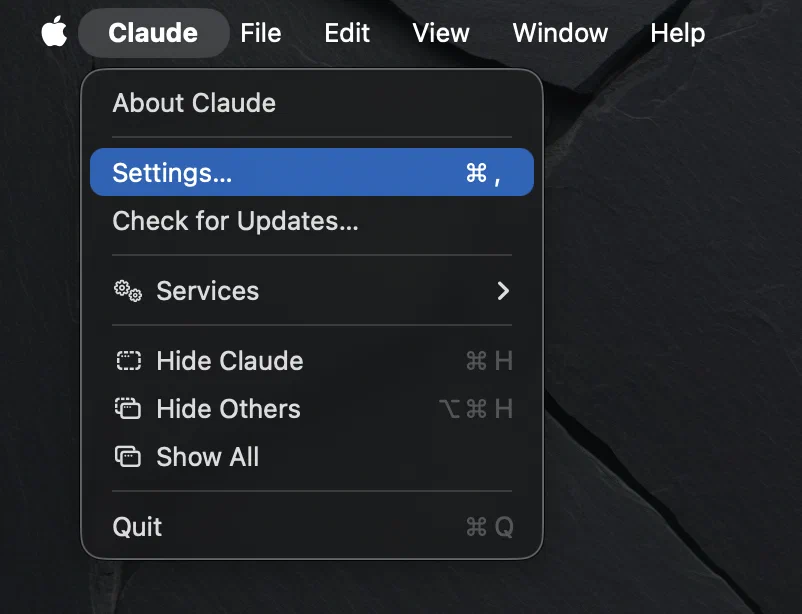
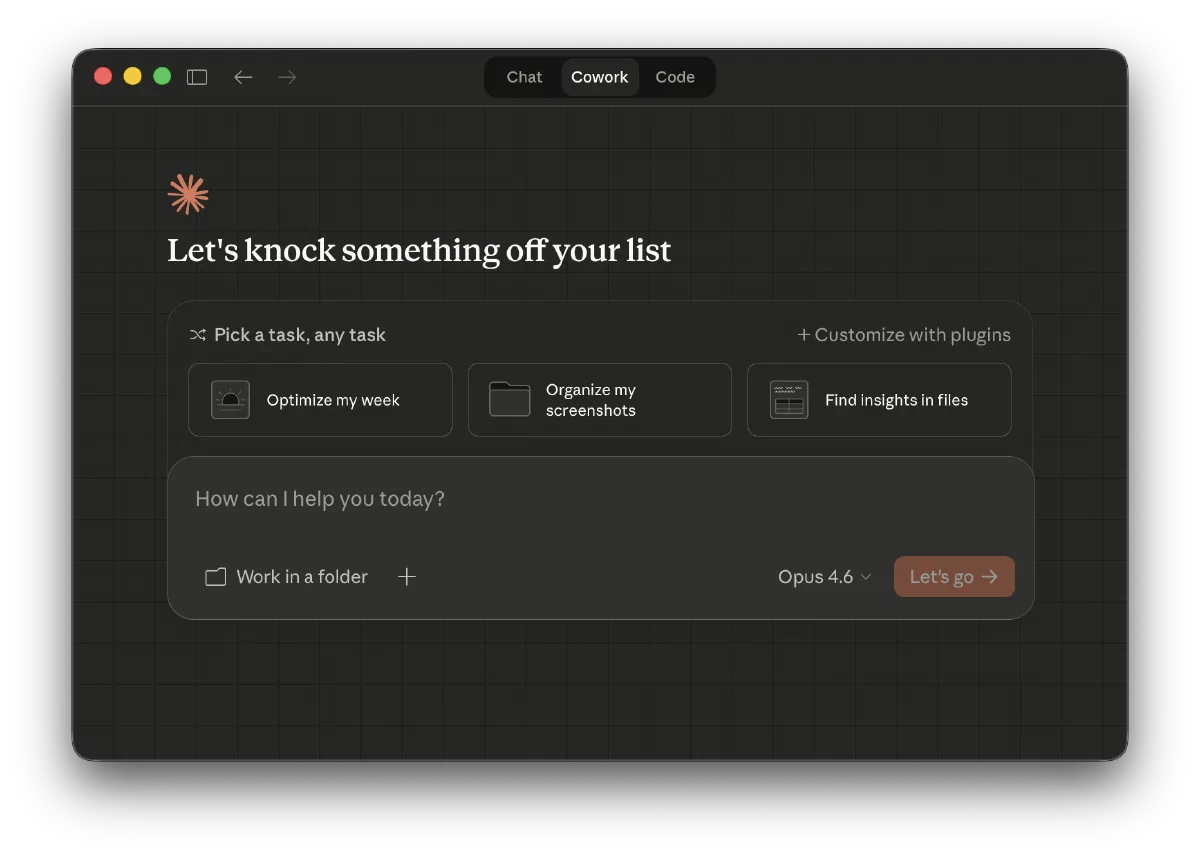 The next step is installing the plugin. Surprisingly, clicking on the “+Customize with plugins” button won’t work! Out of the box Claude isn’t allowed to access the GitHub website where we need it to download the plugin from, which means we need a quick side quest over to the app’s settings. On a Mac
 Settings... can be found under the “Claude” menu in the menubar at the top of the screen.
Now navigate to the “Capabilities” section and make sure that “Allow network egress” is checked and the domain allowlist is set to “Package manager only” (which, amongst other things, grants access to GitHub).
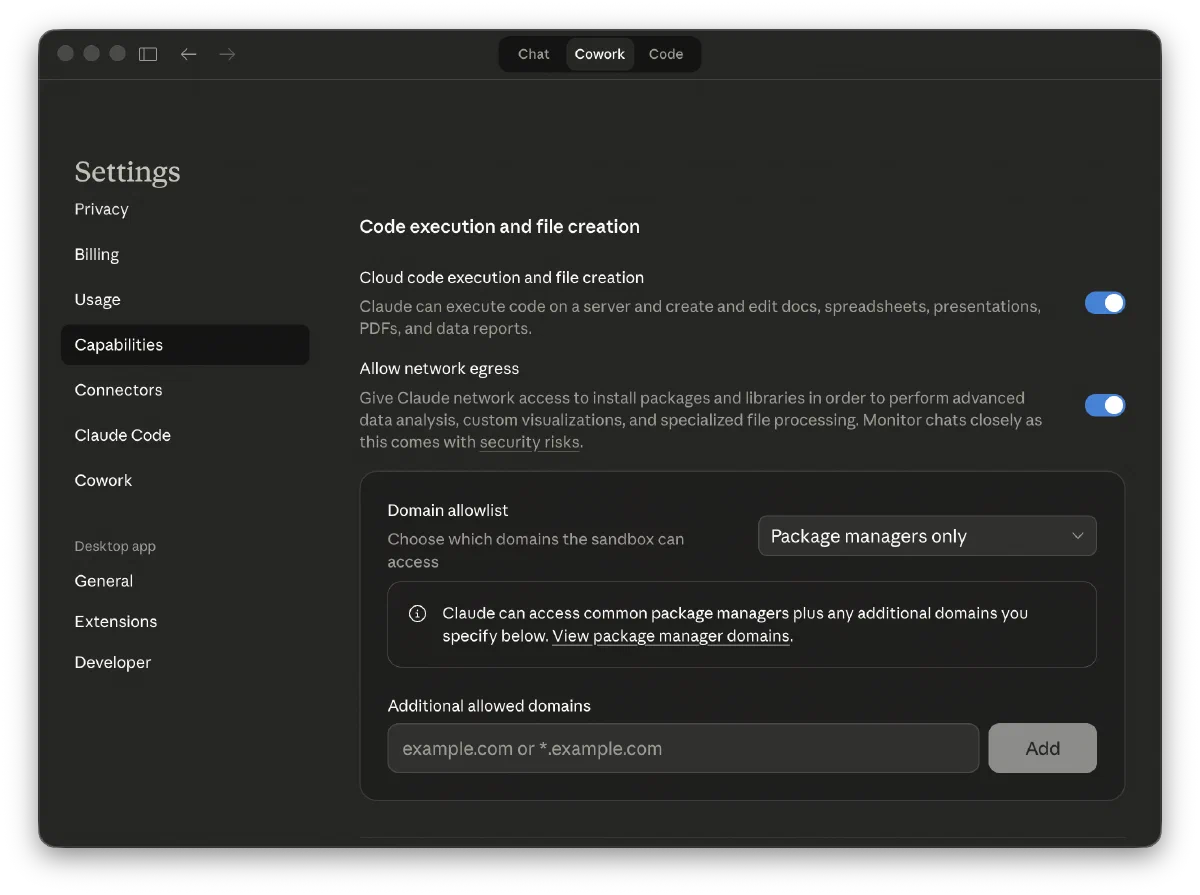 (If you’re feeling paranoid about Claude leaking private information you can come back to turn this setting off again after you’ve installed the plugin)
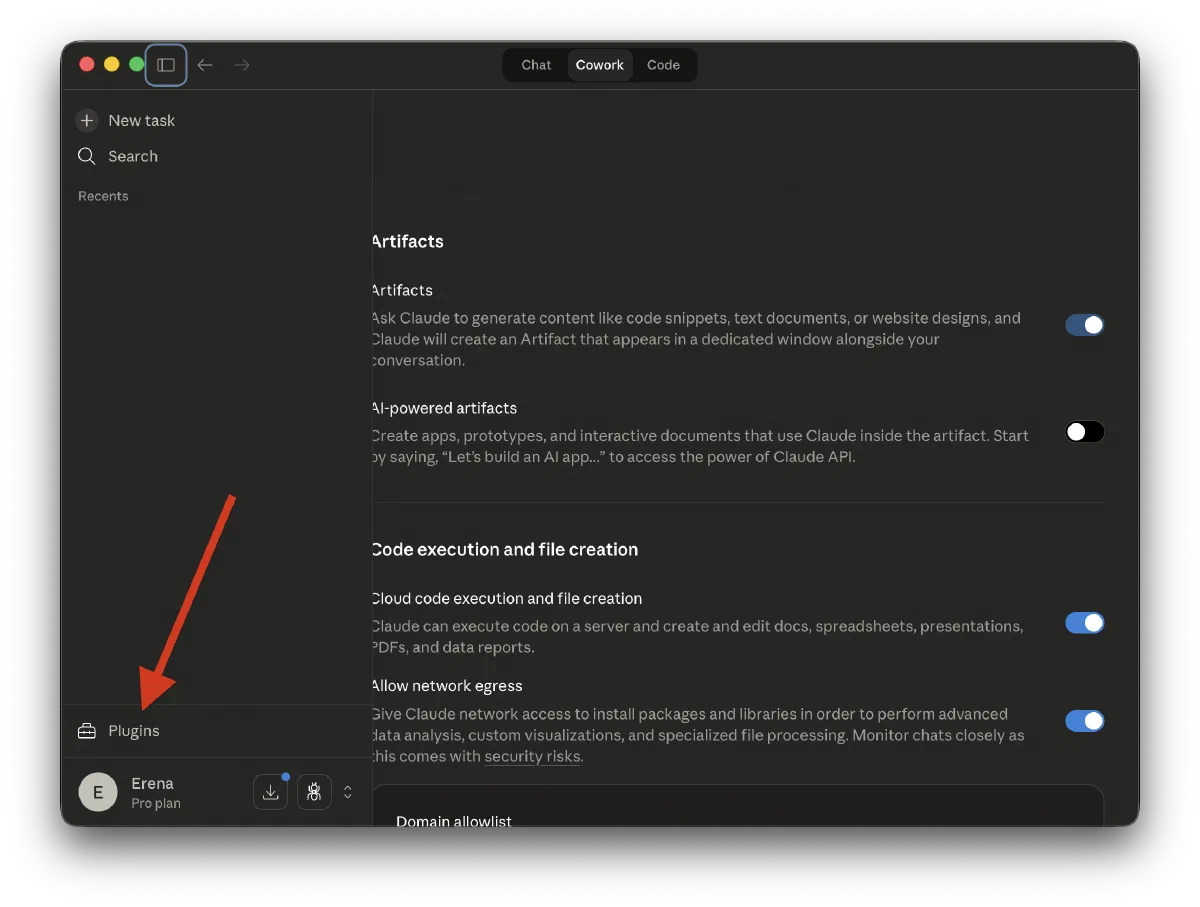
To access the plugin installation dialog we now need to pop open the sidebar by clicking the sidebar icon in the top left corner of the window.
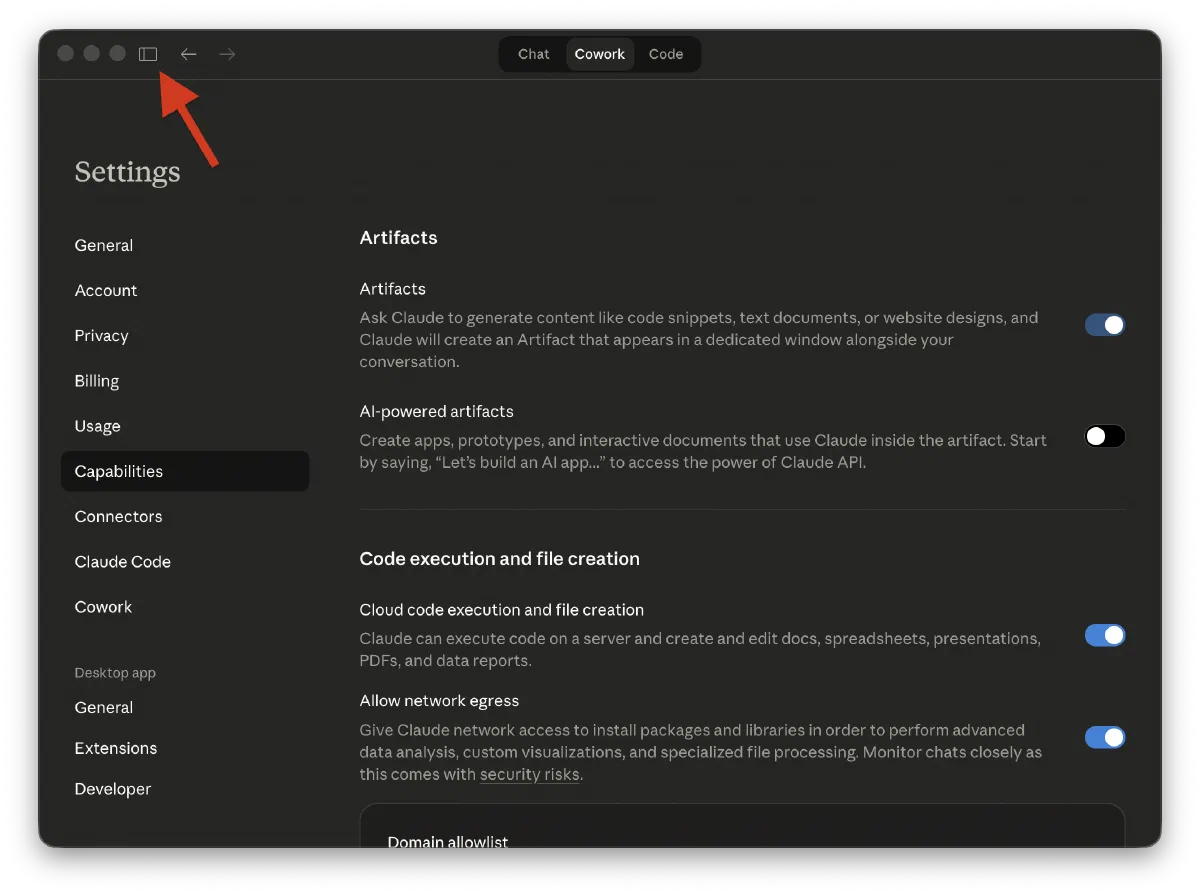
And then clicking on “Plugins” towards the bottom of the sidebar:
 On my system this took a while to complete rendering the dialog, but after a long while the black bars resolved to a screen that looked like this:
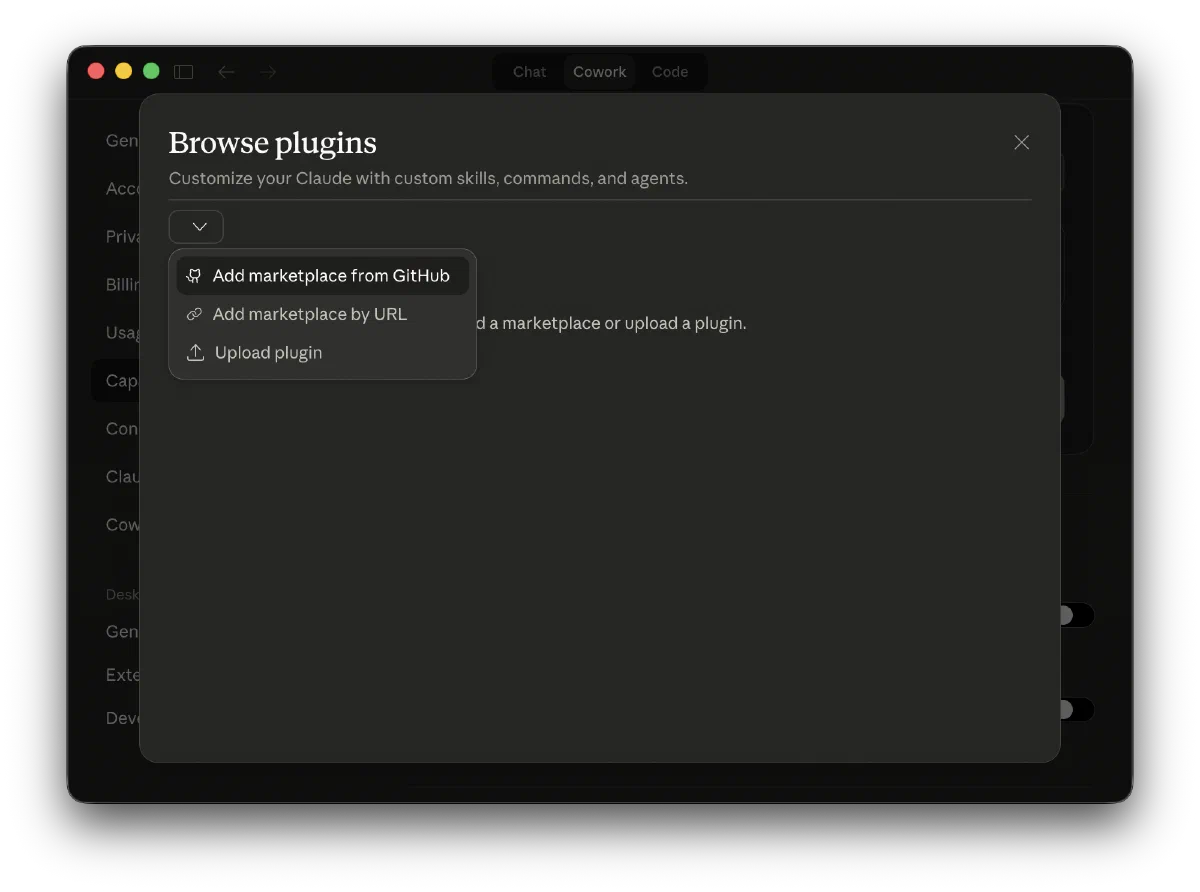
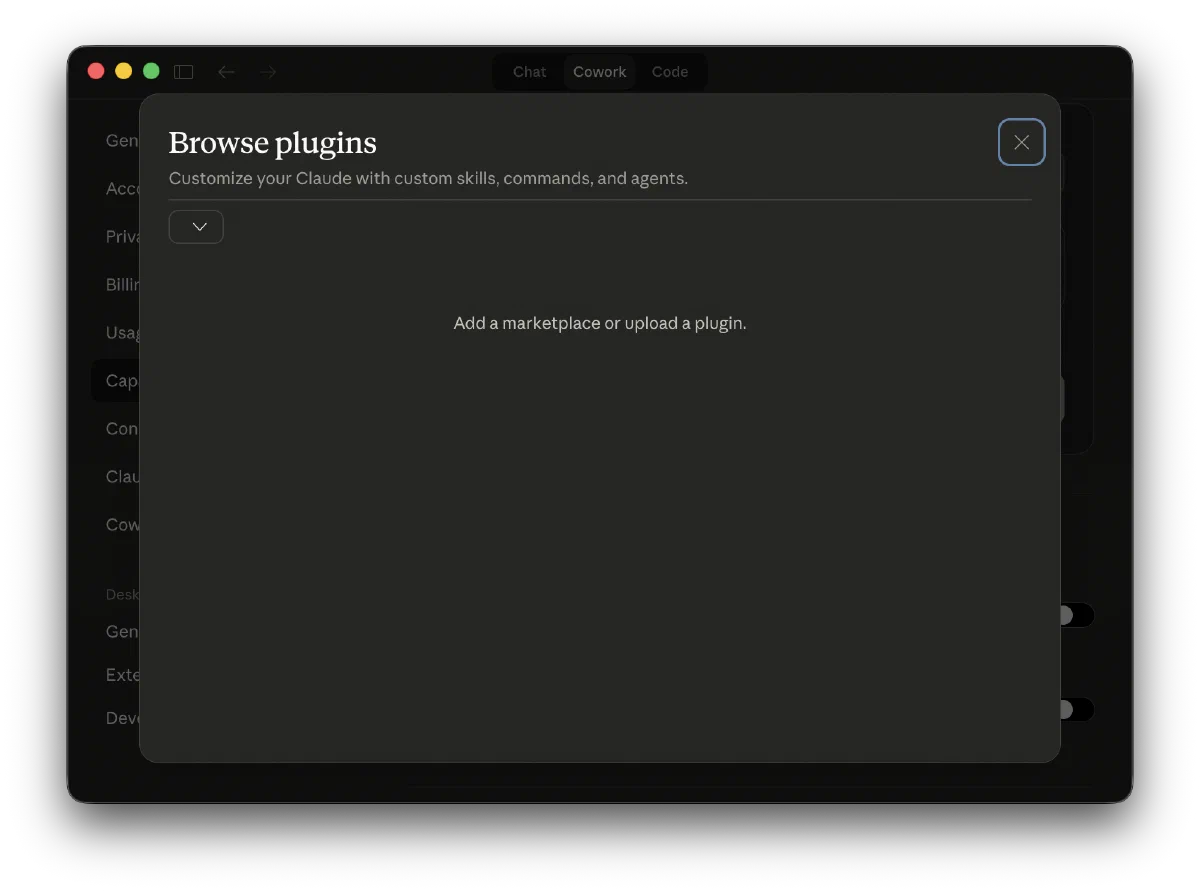 You need to click on the little drop down icon to show the menu, from which you’ll want to select “Add marketplace from GitHub” (it’s possible that the above screen already contains some other options - either way, you’ll want to click on whatever drop down is showing in the top left corner of the screen).
 Then you’ll finally want to type in the name of the “marketplace” that contains the legal skill plugin,
 anthropics/knowledge-work-plugins, and press the sync button.
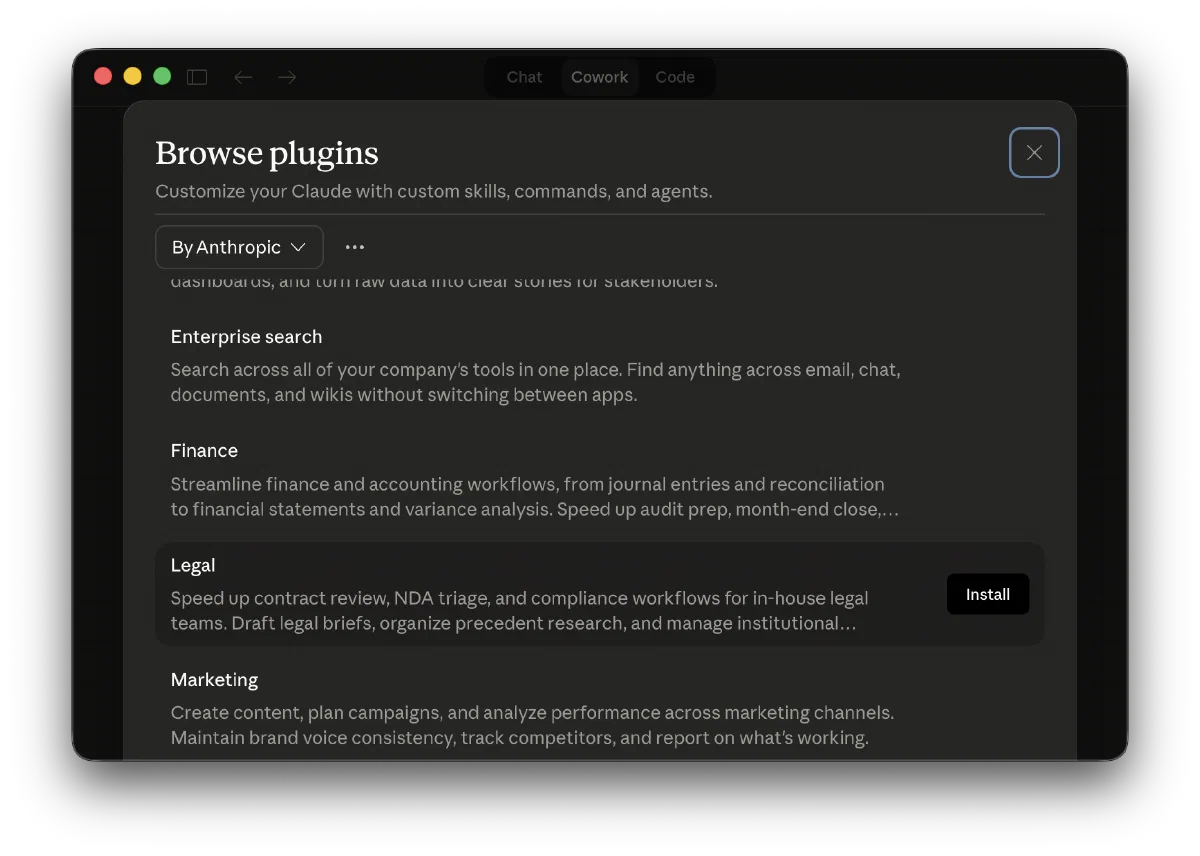
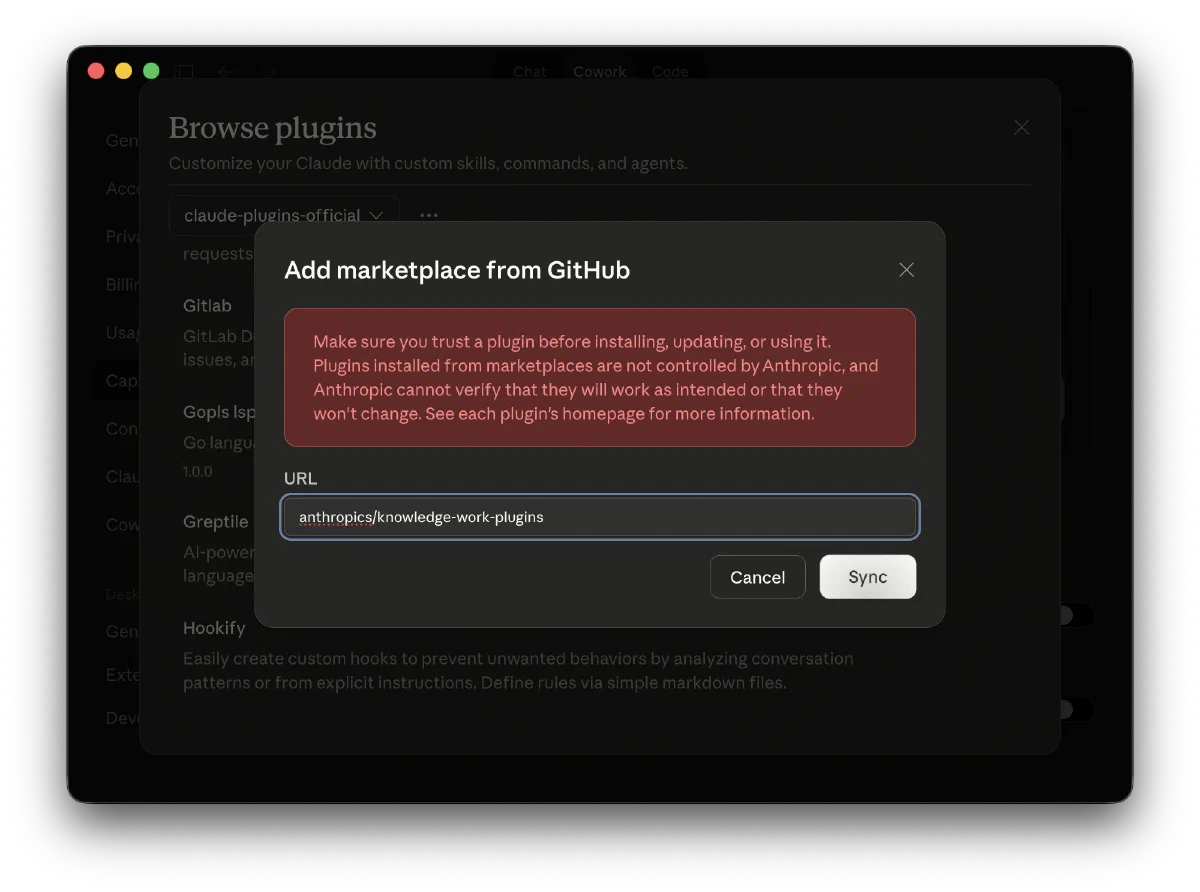 You’ve just successfully added the ability to install any one of Anthropic’s Knowledge Work Plugins and the screen should now show Let’s complete the process by picking the legal plugin and clicking the install button:
A basic example in use
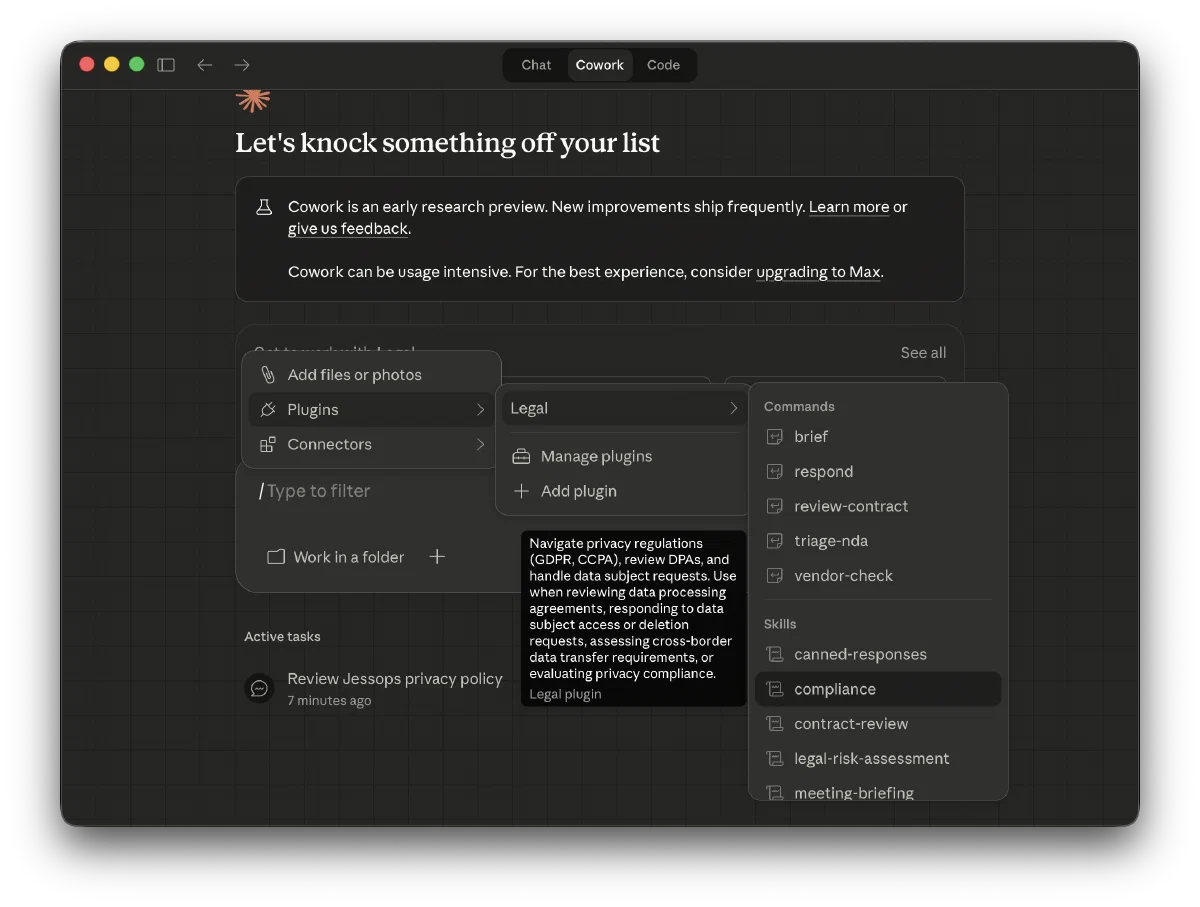
In order to enable a plugin for a particlar prompt in Claude Cowork, you simply need to switch to the Cowork tab and use the corresponding “slash command” for that plugin at the start of your prompt. You can manually type the whole command (e.g. /compliance) or start by just typing just /, which will cause the desktop app to allow you to use a menu to pick the plugin you want from all the installed plugins.
Taking it to the next level
Now we’ve got the ability to install plugins, we can leverage any commands and workflows that anyone on the internet has published. This is incredibly powerful, but even more powerful is teaching Claude how to behave in a particular domain - i.e. how to help us in our own particular role.
We’ll talk about this in my next post, where I’ll teach you how to write (or have Claude write for you!) your own skills plugins.
Last modified on 2026-03-02